728x90
반응형
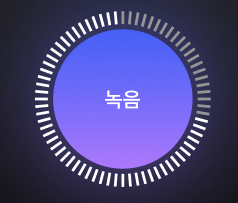
// java
package com.test.alphav.CustomUI;

import android.animation.ValueAnimator;
import android.content.Context;
import android.content.res.TypedArray;
import android.graphics.Canvas;
import android.graphics.Paint;
import android.graphics.RectF;
import android.util.AttributeSet;
import android.view.View;
import android.view.animation.LinearInterpolator;

import androidx.annotation.Nullable;

import com.gitsn.alphav.R;

/**
 * 원형 Segmented Progress - 로딩 인디케이터용
 */
public class SegmentedCircleProgressView extends View {

    private int tickCount = 60;              // 전체 틱 개수
    private float tickWidthPx = 4f;          // 틱 두께
    private float tickLengthPx = 16f;        // 틱 길이
    private float innerRadiusRatio = 0.80f;  // 뷰 반지름 대비 안쪽 시작 비율 (0~1)

    private int activeColor = 0xFFFFFFFF;    // 채워진 틱 색
    private int inactiveColor = 0x55FFFFFF;  // 비활성 틱 색

    private long animDuration = 1200L;       // 인디케이터 회전 속도

    private float progress = 0f;             // 0.0 ~ 1.0
    private boolean isIndeterminate = true;  // true면 로딩 인디케이터처럼 회전

    private final Paint tickPaint = new Paint(Paint.ANTI_ALIAS_FLAG);
    private float radius;                    // 실제 그릴 때 사용할 반지름
    private float rotationOffset = 0f;       // 인디케이터 회전 각도

    private ValueAnimator animator;

    public SegmentedCircleProgressView(Context context) {
        this(context, null);
    }

    public SegmentedCircleProgressView(Context context, @Nullable AttributeSet attrs) {
        this(context, attrs, 0);
    }

    public SegmentedCircleProgressView(Context context,
                                    @Nullable AttributeSet attrs,
                                    int defStyleAttr) {
        super(context, attrs, defStyleAttr);
        initAttrs(context, attrs);
        initPaint();
        initAnimator();
    }

    private void initAttrs(Context context, @Nullable AttributeSet attrs) {
        if (attrs == null) return;

        TypedArray a = context.obtainStyledAttributes(
                attrs,
                R.styleable.CircularTickProgressView
        );
        try {
            tickCount = a.getInt(R.styleable.CircularTickProgressView_ctp_tickCount, tickCount);
            tickWidthPx = a.getDimension(R.styleable.CircularTickProgressView_ctp_tickWidth, dpToPx(2));
            tickLengthPx = a.getDimension(R.styleable.CircularTickProgressView_ctp_tickLength, dpToPx(10));

            // 바깥쪽 원이 안쪽 원보다 떨어질 거리 (0~1)
            innerRadiusRatio = a.getFloat(R.styleable.CircularTickProgressView_ctp_innerRadiusRatio, innerRadiusRatio);
            activeColor = a.getColor(R.styleable.CircularTickProgressView_ctp_activeColor, activeColor);
            inactiveColor = a.getColor(R.styleable.CircularTickProgressView_ctp_inactiveColor, inactiveColor);
            animDuration = a.getInt(R.styleable.CircularTickProgressView_ctp_animDuration, (int) animDuration);
        } finally {
            a.recycle();
        }
    }

    private void initPaint() {
        tickPaint.setStyle(Paint.Style.STROKE);
        tickPaint.setStrokeCap(Paint.Cap.ROUND); // 양 끝 둥글게 (이미지 느낌 살리기)
        tickPaint.setStrokeWidth(tickWidthPx);
        tickPaint.setColor(activeColor);
    }

    private void initAnimator() {
        animator = ValueAnimator.ofFloat(0f, 360f);
        animator.setInterpolator(new LinearInterpolator());
        animator.setDuration(animDuration);
        animator.setRepeatCount(ValueAnimator.INFINITE);
        animator.addUpdateListener(animation -> {
            rotationOffset = (float) animation.getAnimatedValue();
            invalidate();
        });
    }

    @Override
    protected void onAttachedToWindow() {
        super.onAttachedToWindow();
        if (isIndeterminate) {
            startIndeterminate();
        }
    }

    @Override
    protected void onDetachedFromWindow() {
        stopIndeterminate();
        super.onDetachedFromWindow();
    }

    @Override
    protected void onSizeChanged(int w, int h, int oldw, int oldh) {
        radius = Math.min(w, h) / 2f;
    }

    @Override
    protected void onDraw(Canvas canvas) {
        super.onDraw(canvas);

        final float cx = getWidth() / 2f;
        final float cy = getHeight() / 2f;
        final float angleStep = 360f / tickCount;

        // 얼마나 채울지 (ex: progress=0.5, tickCount=60 -> 30개)
        int activeTickCount = (int) (tickCount * clamp(progress, 0f, 1f));

        for (int i = 0; i < tickCount; i++) {
            // 진행/인디케이터에 따라 색 결정
            boolean isActive;
            if (isIndeterminate) {
                // 회전하는 25% 구간만 하얗게 보이게 (원하면 비율 조절)
                int visibleSpan = tickCount / 4;
                int head = (int) ((rotationOffset / 360f) * tickCount);
                int index = (i - head + tickCount) % tickCount;
                isActive = index < visibleSpan;
            } else {
                isActive = i < activeTickCount;
            }

            tickPaint.setColor(isActive ? activeColor : inactiveColor);

            float angle = (i * angleStep) - 90f; // 위쪽(12시 방향)에서 시작
            double rad = Math.toRadians(angle);

            float innerR = radius * innerRadiusRatio;
            float outerR = innerR + tickLengthPx;

            float startX = (float) (cx + innerR * Math.cos(rad));
            float startY = (float) (cy + innerR * Math.sin(rad));
            float endX = (float) (cx + outerR * Math.cos(rad));
            float endY = (float) (cy + outerR * Math.sin(rad));

            canvas.drawLine(startX, startY, endX, endY, tickPaint);
        }
    }

    // ======= 외부에서 쓸 메서드들 =======

    public void setProgress(float progress) {
        this.progress = clamp(progress, 0f, 1f);
        if (!isIndeterminate) {
            invalidate();
        }
    }

    public void setIndeterminate(boolean indeterminate) {
        if (this.isIndeterminate == indeterminate) return;
        this.isIndeterminate = indeterminate;
        if (indeterminate) {
            startIndeterminate();
        } else {
            stopIndeterminate();
        }
        invalidate();
    }

    private void startIndeterminate() {
        if (animator != null && !animator.isStarted()) {
            animator.start();
        }
    }

    private void stopIndeterminate() {
        if (animator != null && animator.isStarted()) {
            animator.cancel();
        }
    }

    private float dpToPx(float dp) {
        return dp * getResources().getDisplayMetrics().density;
    }

    private float clamp(float v, float min, float max) {
        return Math.max(min, Math.min(max, v));
    }
}
// xml
        <com.test.alphav.CustomUI.SegmentedCircleProgressView
            android:id="@+id/recordRing"
            android:layout_width="230dp"
            android:layout_height="230dp"
            app:ctp_tickCount="100"
            app:ctp_tickWidth="3dp"
            app:ctp_tickLength="12dp"
            app:ctp_innerRadiusRatio="0.84"

            app:ctp_activeColor="#40FFFFFF"
            app:ctp_inactiveColor="#FFFFFFFF"
            app:ctp_animDuration="900"

            app:layout_constraintTop_toTopOf="parent"
            app:layout_constraintBottom_toBottomOf="parent"
            app:layout_constraintLeft_toLeftOf="parent"
            app:layout_constraintRight_toRightOf="parent"
            />
// res/value/attrs.xml
<!-- res/values/attrs.xml -->
<resources>
    <declare-styleable name="CircularTickProgressView">
        <attr name="ctp_tickCount" format="integer" />
        <attr name="ctp_tickWidth" format="dimension" />
        <attr name="ctp_tickLength" format="dimension" />
        <attr name="ctp_innerRadiusRatio" format="float" /> <!-- 0~1 -->
        <attr name="ctp_activeColor" format="color" />
        <attr name="ctp_inactiveColor" format="color" />
        <attr name="ctp_animDuration" format="integer" />
    </declare-styleable>
</resources>
728x90
반응형
'Android' 카테고리의 다른 글
| androis system UI ( Navigation Bar, Status Bar ) (0) | 2025.12.09 |
|---|---|
| SSL 소켓 연결 (0) | 2025.11.07 |
| Android View환경에 따른 XML 생성 (0) | 2025.04.21 |
| Android Context 비교 (0) | 2025.04.04 |
| BLE ) isConnectable (0) | 2025.03.13 |